ScanStamp: Local QR print desk
AI generated Generate static QR codes locally with SVG export, PNG preparation and a label outside the clear margin.
Screenshots
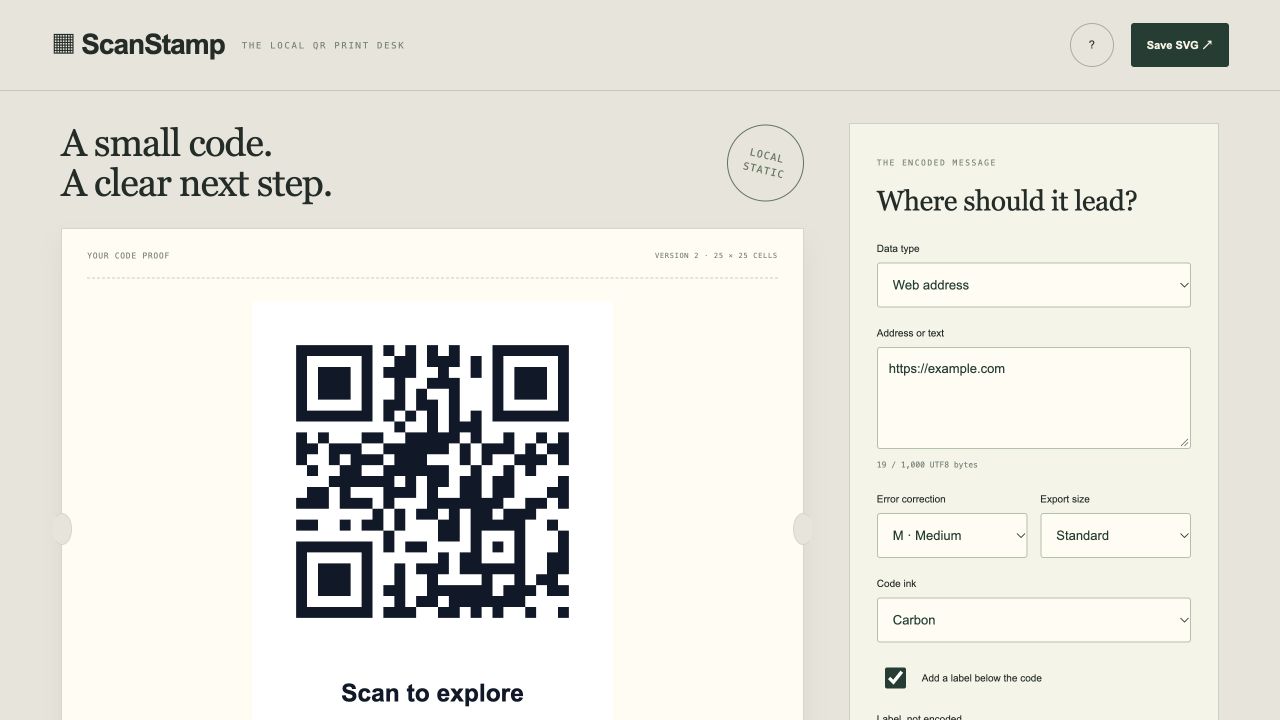
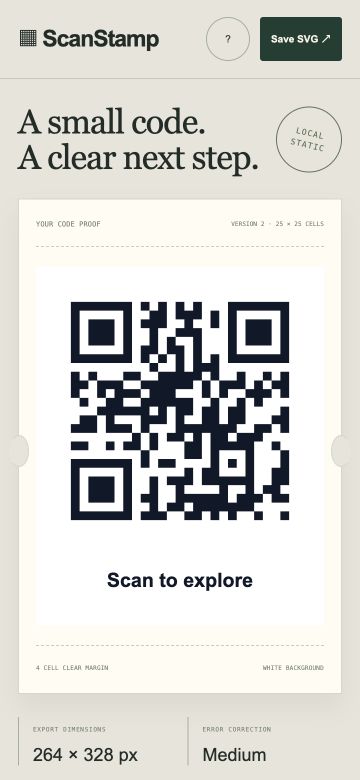
Screenshots supplied by the seller.
Description
AI generated by Codex for Uri Bogat. An original local QR print desk with a paper ticket preview and mobile layout. Encode an HTTP or HTTPS address or plain text up to 1,000 UTF8 bytes using the bundled Project Nayuki QR encoder. Choose correction level, export size and one of three dark inks on white. All codes retain a four module clear margin; the optional label is below it and is not encoded. Includes SVG export, locally prepared PNG with visible image preview and validated JSON backups. Edits hide the old code and clear prepared images until generation is applied again. No redirect service, scan tracking, logo overlay, camera access or destination check.
Editor contents remain in this tab only, on both the hosted demo and standalone source. Export a JSON backup to keep them. No contents are automatically written to browser storage.
Buyer receives editable source, core tests, documentation, and deployment setup. Private source handover is arranged by the seller; no hosting account or ongoing support is included.
Condition
Development stage: Working prototype (seller-declared)
Seller-declared: provided by the seller, not independently verified by SellMyVibe.
- Solo creator
- Mainly AI-generated
- Under one month in development
- Tests included
- Setup guide included
- Demo available
What works
- Static URL or Unicode text encoding with four correction levels and fixed clear margin
- Three dark ink presets, five export scales and optional label outside the QR area
- SVG export and PNG preparation with actual image preview
- Exact encoded data display and validated editable JSON backups
- JSON backup/import; hosted demo works in memory without network requests
What’s unfinished
- No dynamic redirects, scan analytics, logo overlays, camera scanning or destination availability checks
- Physical scanner and print compatibility depend on final size and conditions and need user testing
- Browser file receipt is not independently certified; sample address is fictional
Included assets
Full source code
Documentation
Deployment setup
Test suite
Technologies
HTML5, CSS3, Vanilla JavaScript ES modules, Project Nayuki QR Code generator 1.8.0
Setup requirements
Unzip source and run python3 -m http.server 8080 in the folder. Open http://localhost:8080 or deploy to a static HTTPS host. No build or API key. Node 20+ runs test.mjs. See README.md and QA.md.
Dependencies and ongoing costs
Runtime bundles Project Nayuki QR Code generator 1.8.0 (MIT). Source verification also includes jsQR 1.4.0 (Apache 2.0), excluded from the hosted demo. Licenses and provenance are included. No network API, backend, external font, image or paid subscription is required at runtime. Static HTTP/HTTPS hosting is required; hosting plans and custom domains may cost extra.
Known limitations
Working prototype. No dynamic redirects, scan analytics, logo overlays, camera scanning or destination availability checks. Physical scanner and print compatibility depend on final size and conditions and need user testing. Browser file receipt is not independently certified; sample address is fictional. App data resets on reload in the hosted demo; export JSON backups. See the app description for standalone storage behavior. No independent security audit or broad device/browser certification.
Listings are reviewed for completeness and clarity before publication. Approval is not a guarantee of quality, ownership, security or commercial success. Read the details and ask questions before buying.