Atelier Curriculum Studio
AI generated. Course sequencing, lesson activity budgets, outcome coverage, prerequisite maps and portable teaching packets, with an optional shared LMS server.
Screenshots
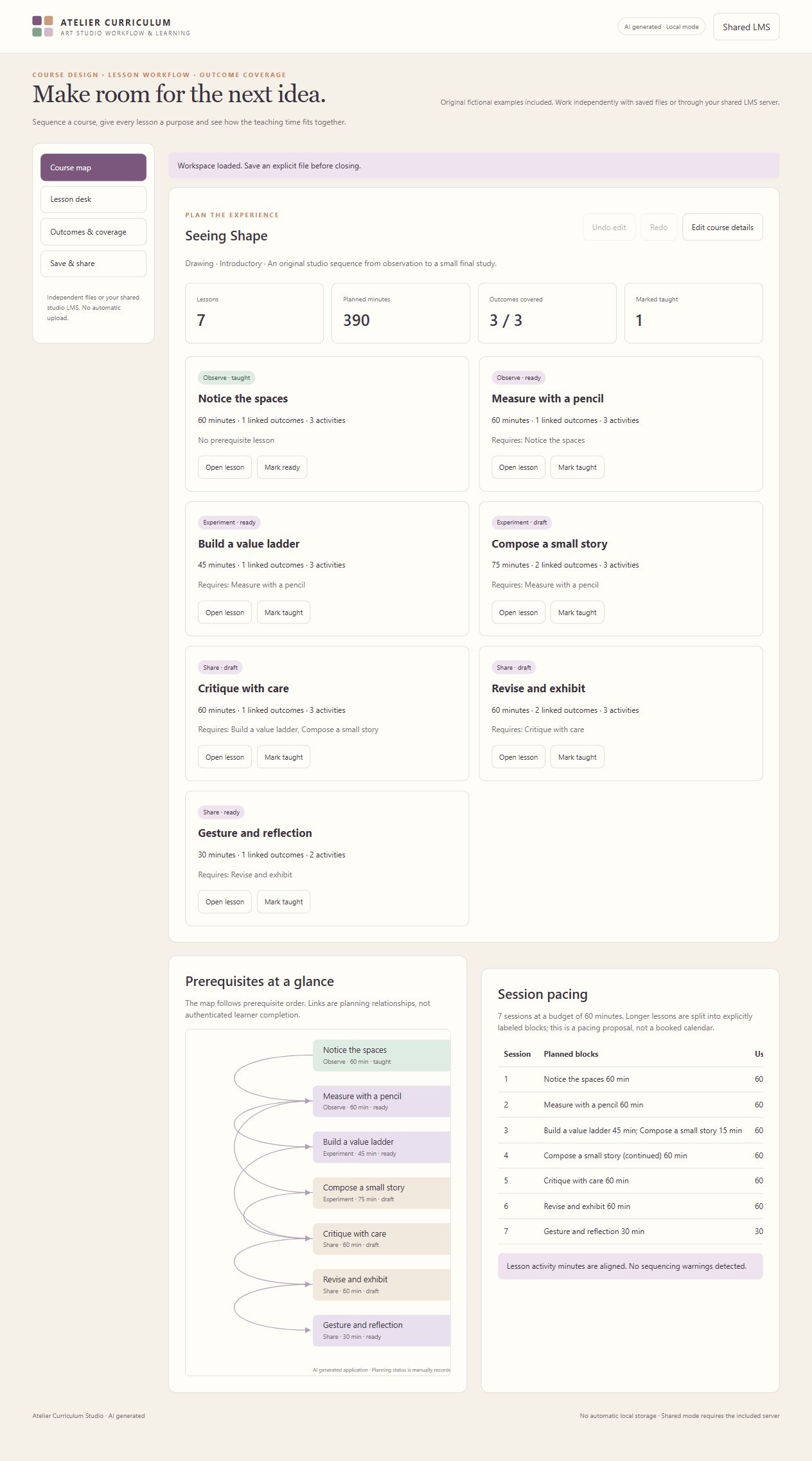

Screenshots supplied by the seller.
Description
AI generated. Atelier Curriculum Studio helps art teachers turn a course idea into a teachable sequence. Build lessons with activities, link learning outcomes and evidence, and add prerequisite relationships. The app rejects cycles and checks activity minutes before a lesson can be marked ready.
The course map shows planning status and prerequisite links. A pacing proposal divides lesson time across a chosen session budget, explicitly marking continued blocks. A coverage matrix highlights which lessons support each outcome. Undo and redo, portable workspace files, a teaching run sheet, a course exchange packet and an editable map SVG support further planning and handoffs.
This application works independently in a browser using explicit workspace files. The supplied self hosted LMS server adds teacher and student accounts, private or class shared workspaces, submissions, private teacher feedback and revision bound review decisions. The marketplace demo runs independent local mode and does not simulate shared authentication. This package includes this application and the common server, not all other suite frontends.
Condition
Development stage: Mostly built (seller-declared)
Seller-declared: provided by the seller, not independently verified by SellMyVibe.
- Solo creator
- Mainly AI-generated
- Under one month in development
- Tests included
- Setup guide included
- Demo available
What works
- Course details, lesson sequencing and original fictional drawing course
- Prerequisite cycle and missing link checks
- Ready lesson outcome and activity timing validation
- Session budget pacing with continued lesson blocks
- Learning outcome coverage matrix and evidence descriptions
- Fifty edit undo history, checked workspace files and teaching exports
- Optional shared account server with ownership, submissions, feedback and revision bound reviews
What’s unfinished
No managed hosting, production deployment, SSO, email, SCORM, LTI, organization tenancy or independent security audit. The connected shared browser session was not tested. Shared API boundaries were tested with the Flask HTTP test client.
Included assets
Editable browser application source
Original fictional teaching examples
Shared LMS server source
Server role and persistence tests
Application behavior checks
Setup and workflow documentation
Real running interface screenshots
Verification notes and dependency disclosures
Technologies
HTML, CSS, JavaScript, original SVG and Canvas where relevant; Python, Flask, Waitress and SQLite for optional shared mode
Setup requirements
Open index.html for independent use. Save an explicit workspace file before closing. For shared mode, install backend requirements, run backend/install_app.py, create a teacher account using backend/server.py, then start the included Waitress server and open the installed app through its address. See README.md and backend/README.md.
Dependencies and ongoing costs
Independent mode needs a current browser and no paid service or external JavaScript library. Shared mode requires Python 3.12 or later, Flask 3.1.3, Waitress 3.0.2 and their open source dependencies installed from the included requirements. No hosting is purchased or supplied. Multi device deployment requires an HTTPS reverse proxy and operational configuration; any hosting costs depend on the chosen provider.
Known limitations
Up to 100 lessons, 30 outcomes and 12 activities per lesson. A pacing proposal is not a booked calendar or guaranteed teaching duration. Taught status is manually recorded and does not verify student attainment. The course exchange packet is a transfer format, not SCORM or an accredited course. Local files do not authenticate users or synchronize accounts. Local planning status is not an authenticated LMS review. Shared permissions operate at one studio installation, with teachers able to read learner work. The supplied server binds to the local computer by default. Multi device hosting, HTTPS configuration and a connected browser session were not verified. No automatic local storage. Browser download delivery and file picker paths may vary; visible JSON or text alternatives are provided.
Listings are reviewed for completeness and clarity before publication. Approval is not a guarantee of quality, ownership, security or commercial success. Read the details and ask questions before buying.